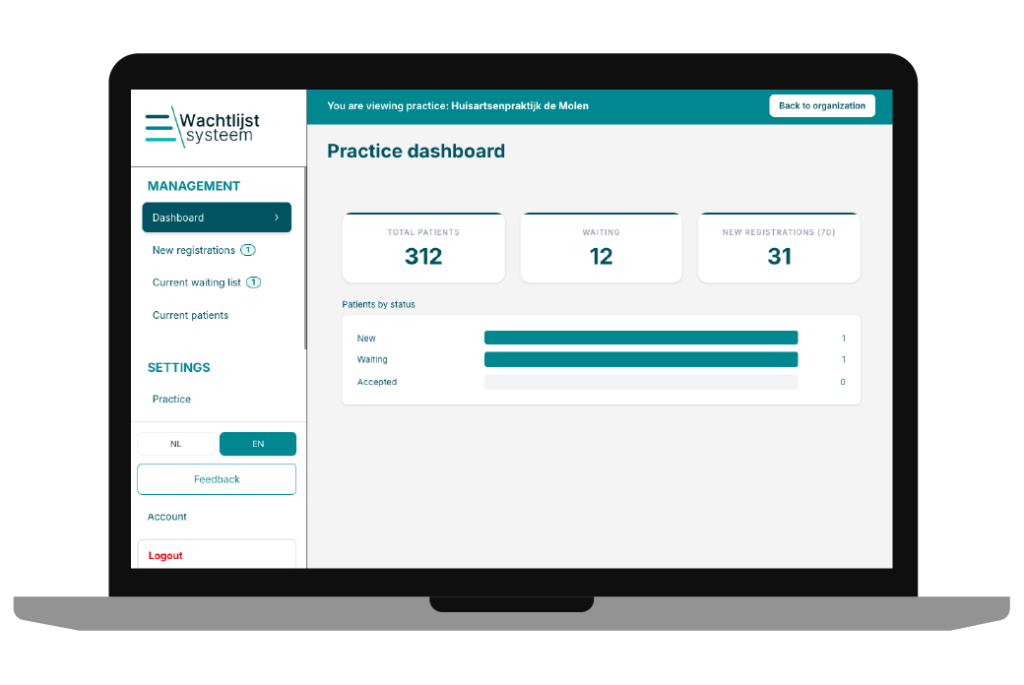
Save time and stay in control of your registrationsn
With Wachtlijstsysteem, you can manage your waiting list easily and clearly. You remain in control of registrations, communication, and patient flow. Below you can read step by step how it works.
Save time by handling new registrations efficiently
Data securely stored on Dutch servers
Access control, logging, and encryption included as standard
Save time by handling new registrations efficiently
Data securely stored on Dutch servers
Access control, logging, and encryption included as standard
How does it work for your healthcare organization?
For your organization, the management process is structured and efficient. Below you can see the steps you follow to manage your waiting list professionally.
1. Register
You register your healthcare organization and immediately gain access to your personal management environment.
2. Set postal code areas
Upload a list of allowed postal codes if you work with a service area. No postal code restrictions? Then you can skip this step.
3. Customize the registration form
You decide which information you want to request, such as personal details, national ID number, insurance information, and care request. The form fully aligns with your workflow.
4. Adjust emails
Customize the automatic emails with your own texts, such as confirmations and waiting time information.
5. Place the form on your website
Easily place the registration form on your website. No technical knowledge required. Need help? We support you.
6. Receive online registrations
Patients register online. Applications are automatically received in your management environment.
7. Manage the waiting list
Review new applications, move patients to the waiting list or to the list of current patients, and maintain full overview.
Save time and stay in control of your registrations
Start today with a clear and secure waiting list system for your healthcare organization.
For patients, the registration process is simple and transparent. Below are the steps they go through.
1. Register online
The patient registers via the form on your website. The data is securely transmitted and processed directly in your system.
2. Confirmation by email
After registration, the patient automatically receives a confirmation email. It confirms that the application has been received and explains the next steps.
3. Identity verification with Entrust module
If you use the additional Entrust module, the client can complete an online identity verification themselves. This saves time and prevents an extra visit.
3. Identity verification without Entrust module
If you do not use this module, the patient visits your healthcare organization to verify their identity.
4. Status updates
The patient automatically stays informed about status changes. For example, when the application moves from new registration to waiting list, or from waiting list to registered patient.
Always overview and control
With Wachtlijstsysteem, you work in a structured and efficient way. You avoid scattered emails, unclear spreadsheets, and duplicate administration.
You maintain calm within your organization and clarity for your patients.
We gebruiken cookies om ervoor te zorgen dat onze site zo soepel mogelijk draait. Als je doorgaat met het gebruiken van deze site, gaan we ervan uit dat je ermee instemt.